
YouTube Fan Funding & Apple Cut Estimator
Calculate your true net earnings from YouTube fan funding. See exactly how much Apple, YouTube, and US Withholding Taxes take from your revenue.
Revenue Details
* The total amount generated before any platform fees.
Averages: Gaming (15-25%), Tech/Finance (20-30%), Lifestyle/Vlogs (40-60%).
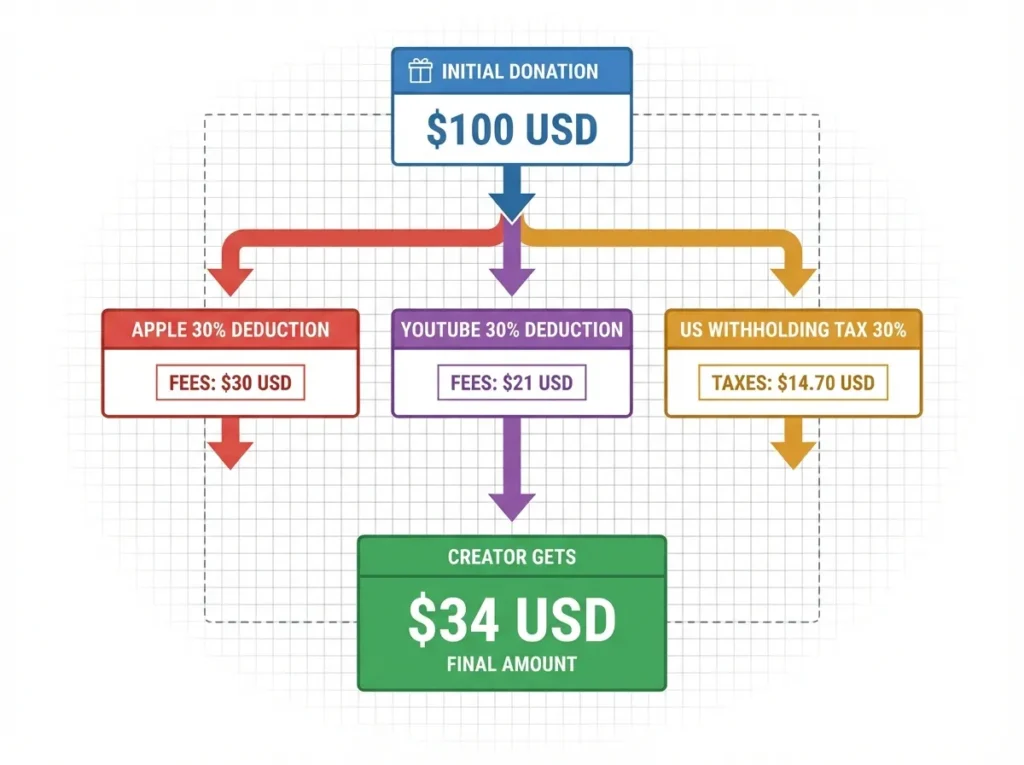
How the "Triple Tax" Works
Web / Android Donations
Purchases made on desktop or Android avoid App Store fees. YouTube takes its standard 30% cut. You keep 70% (before local taxes).
Apple (iOS) Donations
Apple takes 30% off the top. YouTube then takes 30% of the remaining 70% (which equals 21% of the total). You are left with only 49% of the original donation.
US Withholding Tax (Non-US)
Google is required by the IRS to withhold up to 30% of the royalties you earn specifically from US viewers, further reducing your net take-home.
Net Creator Take-Home
- -
Effective Blended Fee: --%
Fee Breakdown
Performance Efficiency
Net Earnings Per Hour
- -
* Based on time spent vs final net earnings.
Most creators are shocked when they see how little of their Super Chat revenue they actually keep. Between YouTube’s platform fee, Apple’s App Store cut on iOS donations, and US Withholding Tax for non-US creators, your real take-home can drop to under half of the original donation.
This free tool calculates your exact net earnings from YouTube Super Chat, Super Thanks, Channel Memberships, and Super Stickers accounting for Apple’s 30% iOS fee, YouTube’s 30% platform cut, and IRS withholding tax on US viewer revenue.
What the “Triple Tax” Does to Your Super Chat Revenue
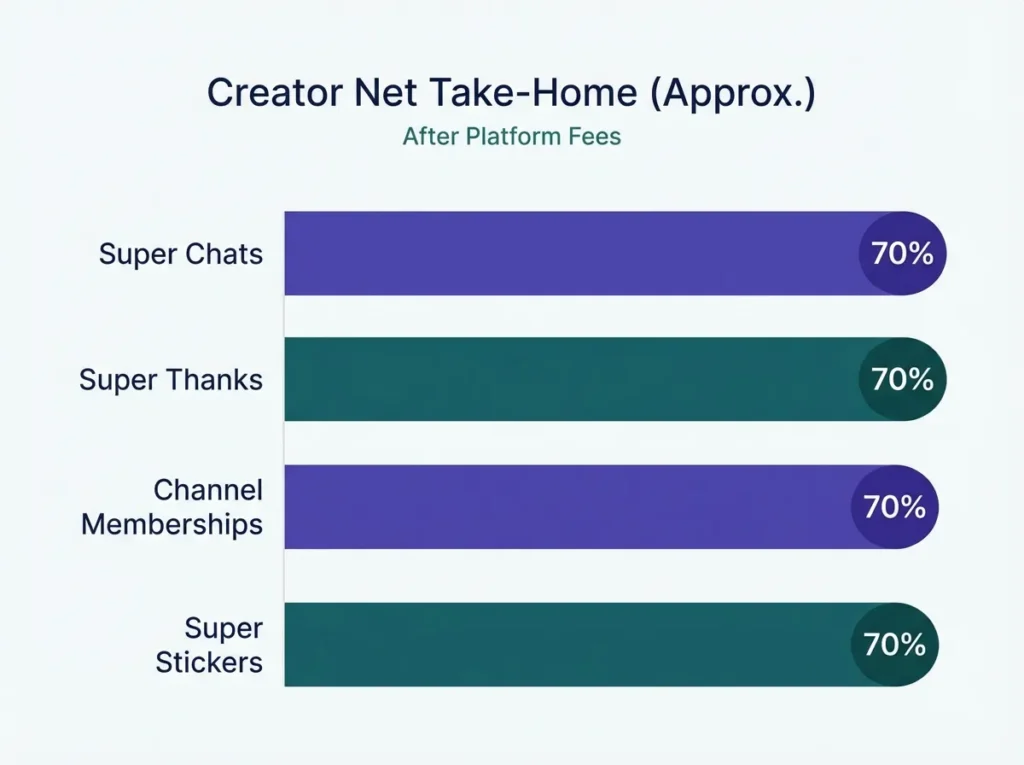
When a viewer sends a Super Chat, YouTube takes its standard 30% cut from all donations whether the purchase was made on Android, desktop, or iOS. That part most creators know.
The problem hits iOS users. Apple takes 30% off the top of any in-app purchase first. YouTube then takes its 30% cut from the remaining 70%, leaving you with just 49% of the original super chat amount before any income tax.
Then, if you’re a non-US creator with US viewers, Google is required by the IRS to withhold up to 30% of royalties earned from those viewers via your AdSense account. That’s a third deduction on top of the first two. Creators who rely on live stream revenue often don’t see this third layer until their payout hits their bank account.
The effective blended fee is what this tool calculates a single percentage that reflects your real net after all three hits.
The Fee Calculation Logic Behind Each Funding Source
The formula changes slightly depending on your funding source. Here’s how each one works:
Super Chats (Livestreams) & Super Thanks (VODs):
- Web/Android: Net = Gross x 0.70
- Apple iOS: Net = Gross x 0.70 x 0.70 = Gross x 0.49
Channel Memberships (monthly subscriptions):
- Same structure as above YouTube keeps 30%, Apple takes its cut first on iOS transactions.
Super Stickers:
- Treated identically to Super Chats by YouTube’s monetization policy.
US Withholding Tax layer (Non-US creators):
- Applied only to the portion of revenue from US viewers.
- Formula: Withholding Deduction = (Net After Platform Fees) x (% US Audience) x (Tax Treaty Rate)
- Tax treaty rate options: 30% (no treaty/default), 15% (standard treaty), 0% (full exemption)
Limitations to understand: This tool uses YouTube’s published fee structure. It does not account for local income tax in your home country, currency conversion losses, or AdSense payment threshold timing. Also, YouTube’s 30% fee is applied before your gross earnings display in YouTube Studio or YouTube Analytics — meaning the $1,000 you see in your dashboard is already post-YouTube-cut, not pre-cut. Always verify against your actual AdSense payout.
According to YouTube’s official Help Center, Super Chat payments are non-refundable, and the fee structures described here are governed by YouTube’s monetization terms.
Net Earnings Benchmarks by Funding Scenario
| Gross Donation | Source / Device | Apple Cut | YouTube Cut | US WHT (30%) | Creator Gets |
|---|---|---|---|---|---|
| $100 | Web / Android | $0 | -$30 | $0 | $70.00 |
| $100 | Apple iOS | -$30 | -$21 | $0 | $49.00 |
| $100 | Apple iOS + US WHT | -$30 | -$21 | -$14.70 | $34.30 |
| $500 | Web + 50% US Audience | $0 | -$150 | -$52.50 | $297.50 |
| $500 | Apple iOS + 50% US Audience | -$150 | -$105 | -$36.75 | $208.25 |
| $1,000 | Web + Full US Audience | $0 | -$300 | -$210 | $490.00 |
WHT = US Withholding Tax. Assumes 30% default treaty rate and 100% US audience where applicable.
A Real Creator Scenario: Mia’s 3-Hour Livestream
Mia is a Tech/Finance creator based in the UK. She runs a 3-hour YouTube live stream and earns $500 in total Super Chat revenue. About 30% of her donations come from iOS devices, and roughly 50% of her audience is from the United States.
Here’s how her earnings break down:
Step 1 – Split by device:
- iOS portion: $500 x 0.30 = $150
- Web/Android portion: $500 x 0.70 = $350
Step 2 – Apply YouTube’s 30% platform fee:
- iOS after Apple + YouTube: $150 x 0.49 = $73.50
- Web after YouTube: $350 x 0.70 = $245.00
- Combined subtotal: $318.50
Step 3 – Apply US Withholding Tax:
- US revenue portion: $318.50 x 0.50 = $159.25
- WHT at 30% (no treaty): $159.25 x 0.30 = $47.78
- Final net: $318.50 – $47.78 = $270.72
Mia’s effective blended fee is approximately 45.9%. She earns roughly $90.24 per hour of streaming a number she’d never have seen just by looking at her gross super chat donations in YouTube Studio.
To compare this against platform alternatives like TikTok, see the TikTok to YouTube Conversion Value Estimator for a side-by-side look at where creator monetization is more efficient.
What Most Creators Get Wrong About Platform Fees
Mistake 1: Treating all donations as equal. A $100 super chat donation from an iPhone user and a $100 donation from a desktop viewer are not equal. The iOS donation nets you $21 less before any tax. This matters most for lifestyle and vlog creators whose iOS audience share can hit 40-60%.
Mistake 2: Ignoring the withholding tax layer. Many non-US creators don’t realize Google will pay out their US viewer revenue at a reduced rate until they see the deduction on their AdSense account statement. If your country has a tax treaty with the US (like the UK, Japan, or Germany), you may qualify for a 15% or even 0% rate instead of the default 30%. You need to submit the correct tax form in your AdSense account to claim this.
Mistake 3: Comparing Super Chats to Patreon or PayPal without adjusting for fees. Patreon charges 5-12% depending on your plan. PayPal’s standard transaction fee is around 2.9% + fixed fee. YouTube’s effective rate is 30-51% once iOS is factored in. If a subscriber is deciding between a YouTube membership and supporting you on Patreon, the difference in what you keep per dollar is significant.
For creators who run sponsorships alongside fan funding, the YouTube Podcast Sponsorship CPM & Flat Rate Calculator helps you benchmark what you should charge per sponsor deal relative to your fan funding income.
How to Use This Calculator
The tool interface is split into two panels: Revenue Details on the left and the “Triple Tax” explainer on the right.
Step 1 — Select your Funding Source from the dropdown. Options include Super Chats (Livestreams), Super Thanks (VODs), Channel Memberships, and Super Stickers.
Step 2 — Enter your Total Gross Revenue in USD. This is the total amount generated before any platform fees not the figure shown in YouTube Analytics after YouTube’s cut.
Step 3 — Enter Livestream Duration in hours (used to calculate your net earnings per hour efficiency metric).
Step 4 — Set your % of Revenue from Apple iOS Devices. The tool provides niche averages as a guide: Gaming 15-25%, Tech/Finance 20-30%, Lifestyle/Vlogs 40-60%.
Step 5 — Check “Apply US Withholding Tax” if you are a non-US creator. Two new fields appear: your % of US audience and your country’s tax treaty rate (30% default, 15% standard treaty, or 0% full exemption).
Step 6 — Set Base Currency and your target “Convert Net Take-Home To” currency. The tool supports 20+ currencies including INR, JPY, PKR, GBP, EUR, and more.
Step 7 — Click “Calculate Net Earnings.” The results panel shows your Net Creator Take-Home, Effective Blended Fee %, a full Fee Breakdown (Apple cut, YouTube cut, WHT), Net Earnings Per Hour, and your converted earnings in the target currency.
Use the Print or Share buttons to save or send your results. Hit Reload Calculator to start a fresh calculation.
Free, Accurate, and Built on YouTube’s Published Fee Structure
This calculator is 100% free to use no sign-up, no credit card, no paywall. The fee logic is based directly on YouTube’s monetization policies and IRS withholding tax rules for non-US creators.
Currency conversion rates are updated regularly to reflect real-world deposit values. Whether you’re planning a monthly live stream budget or deciding how to monetize your channel, the numbers here reflect the same logic Google will apply when calculating your actual payout.
FAQs About YouTube Super Chat Fees & Creator Earnings
Does YouTube take 30% of every Super Chat?
Yes. YouTube takes a 30% platform fee from all Super Chat revenue, regardless of the device used. If the donation came through an iPhone or iPad, Apple also takes 30% before YouTube’s cut reducing your take to just 49% of the original amount.
What is US Withholding Tax and does it affect all creators?
US Withholding Tax only applies to non-US creators earning revenue from US-based viewers. Google is required by the IRS to withhold up to 30% of those royalties. Creators from countries with a US tax treaty can reduce this to 15% or 0% by submitting the correct tax form in their AdSense account.
Is Super Chat revenue the same as ad revenue?
No. Super Chat donations are fan funding payments made directly by viewers during a live stream or on a VOD. Ad revenue flows through AdSense based on impressions and CPM rates. Both appear in YouTube Studio but they are separate income streams with different fee structures. Super chat revenue is non-refundable once processed.
How is Channel Membership revenue different from Super Chats?
Channel Memberships are recurring monthly subscriptions paid by subscribers. The fee structure is the same YouTube keeps 30%, Apple takes its cut first on iOS – but the income is predictable month to month rather than dependent on live stream activity. Super Stickers follow the same fee logic as Super Chats.