
Content Creator Home Studio Tax Write-off Estimator
Office Space & Expenses
Itemized Equipment List
Tax Profile & Customization
* Use Custom RPM Override if living outside the US with a flat tax rate.
Total Annual Tax Savings
- -
Money kept in your business instead of paying taxes.
Deduction Breakdown
Tax Strategy Details
If you film, stream, or record from home, a portion of your rent, utilities, internet bill, and gear is legally deductible. This free estimator calculates exactly how much you can write off based on your actual home office square footage, your equipment list, and your real federal and state tax profile.
Every dollar you miss in deductions is a dollar you overpay to the IRS. This tool puts that money back in your pocket before tax season hits.
What Counts as a Home Studio Tax Deduction?
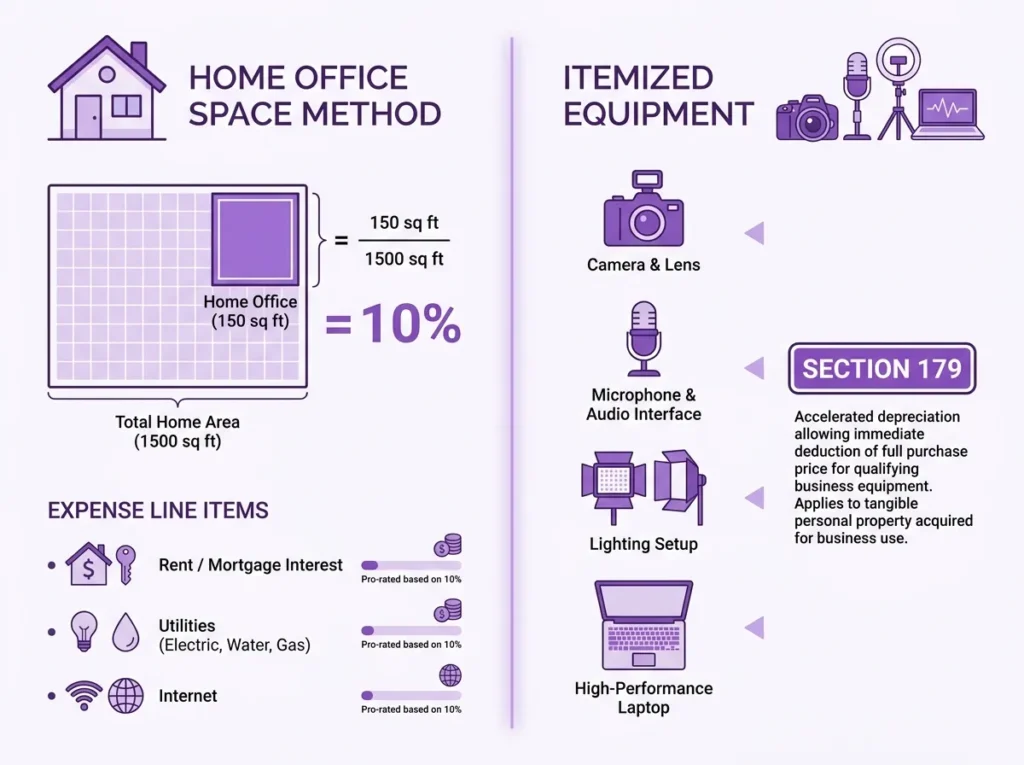
The IRS allows self-employed creators or YouTubers, Twitch streamers, podcasters, and freelance video editors to deduct the business-use portion of their home expenses under IRS Publication 587. This covers your dedicated studio space AND the equipment inside it.
Most creators leave hundreds, sometimes thousands, of dollars on the table simply because they never calculated what they actually qualify for. Your studio space deduction is based on the percentage of your home used exclusively for business. Your equipment deduction is handled separately under Section 179 or standard depreciation rules.
If you track your streaming income using a tool like the Twitch Subathon Clock & Revenue Tracker, pairing it with this estimator gives you a complete picture of income versus deductible expenses.
How the Home Studio Write-Off Calculation Works
The estimator runs two parallel calculations and combines them into your total IRS write-off figure.
Home Office Space Deduction:
Studio Use % = Studio Area (sq ft) / Total Home Area (sq ft)
Deductible Home Expenses = Studio Use % x (Annual Rent + Utilities + Internet)
Simplified Method Alternative:
Deduction = Studio Area (sq ft) x $5 (capped at 300 sq ft maximum, or $1,500 max)
Equipment Deduction (Section 179):
Full equipment cost is written off in Year 1 at 100% business use. Standard depreciation spreads the deduction across the asset’s useful life instead.
Total IRS Write-Off = Home Office Deduction + Equipment Deduction
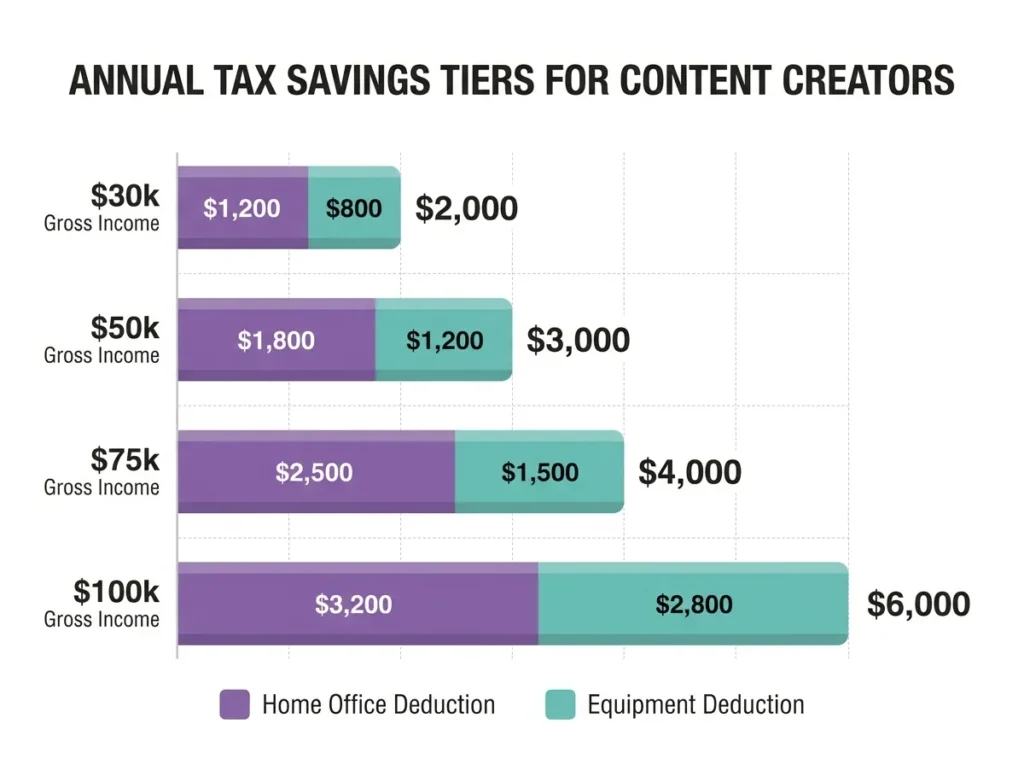
Tax Savings = Total Write-Off x Combined Tax Rate (Federal + State + SE Tax)
The SE Tax (15.3%) component is significant. Business deductions reduce your net self-employment income, which lowers both your income tax AND your SE tax liability simultaneously. This is why the combined tax rate in the results panel often lands between 37% and 45% for creators in the 22% federal bracket.
When This Calculation Doesn’t Apply: If your home studio space is not used regularly and exclusively for business meaning you also use it as a guest bedroom or general living area the IRS disallows the home office deduction entirely under the exclusive use rule. The equipment deduction remains valid regardless, as long as the items are used for your content business.
IRS Home Office Deduction Reference: Standard vs Simplified Method
Standard vs Simplified Home Office Deduction: Key Differences for Creators
| Factor | Regular (Actual Expense) Method | Simplified Method |
|---|---|---|
| Calculation basis | Actual home expenses x business use % | $5 per sq ft of studio space |
| Maximum deduction | No hard cap (based on actual costs) | $1,500 (300 sq ft limit) |
| Requires expense tracking | Yes (rent, utilities, internet bills) | No |
| Best for | Higher-rent markets, larger studios | Small studios, minimal record-keeping |
| Can create a loss | Yes | No |
| IRS form required | Form 8829 (Schedule C filers) | Simplified line on Schedule C |
Section 179 vs Standard Depreciation for Creator Equipment
| Factor | Section 179 | Standard Depreciation (5-yr) |
|---|---|---|
| Year 1 deduction | 100% of equipment cost | ~20% of cost |
| Best for | Maximizing current-year savings | Spreading deductions over time |
| 2026 deduction limit | $1,220,000 | N/A |
| Business use requirement | Must be >50% business use | Same |
A Real Creator’s Numbers: Walking Through the Math
Scenario: Marcus, a full-time YouTube tech reviewer in Austin, TX
- Total home area: 1,500 sq ft
- Dedicated studio room: 150 sq ft
- Monthly rent: $2,000 ($24,000 annually)
- Monthly utilities (power/water): $250 ($3,000 annually)
- Internet/cell (100% business use): $1,200 annually
- Gross business income: $50,000
- Filing status: Single
- Federal tax bracket: 22%
- State tax rate: 5%
- SE Tax: included (15.3%)
- Equipment purchased: $5,000 camera and lighting kit (Section 179)
Step 1: Business use percentage
150 / 1,500 = 10%
Step 2: Home office deduction
10% x ($24,000 + $3,000 + $1,200) = 10% x $28,200 = $2,820
Step 3: Equipment deduction (Section 179)
$5,000 at 100% business use = $5,000
Step 4: Total IRS write-off
$2,820 + $5,000 = $7,820
Step 5: Combined tax rate
22% (federal) + 5% (state) + 15.3% (SE) = 42.3% effective combined rate (after SE adjustment)
Step 6: Annual tax savings
$7,820 x 42.3% = approximately $3,308 saved
Marcus keeps over $3,300 that would otherwise go to federal and state taxes. That is essentially his camera kit paid for by the tax code.
Common Mistakes Content Creators Make With Home Studio Deductions
Mixing personal and business internet costs incorrectly. If you use your internet for both streaming and personal browsing, only the business-use percentage is deductible. The tool lets you set a custom business use percentage for internet/cell to handle this precisely.
Ignoring SE tax savings. Most creators focus on income tax rates and forget that deductions also reduce self-employment tax. At 15.3% SE tax, every $1,000 in additional deductions saves an extra $153 on top of income tax savings.
Choosing the wrong depreciation method for equipment. Section 179 maximizes your Year 1 deduction but can create an unusual tax picture if your income is low. If you are comparing migration between platforms and income projections, the Kick vs. Twitch Earnings Migration Calculator can help you forecast the income side before finalizing your deduction strategy.
Not tracking the square footage split. The IRS requires the studio space to be used regularly and exclusively for business. Measure your actual dedicated recording or streaming space, not a rough estimate. Even a few extra square feet adds meaningful dollars to your deduction.
Creators running YouTube automation agencies should also factor in any home office costs attributable to client work. The YouTube Automation Agency Retainer Margin Calculator pairs well here for full P&L visibility.
How to Use the Content Creator Home Studio Tax Write-Off Estimator
The tool has two tabs at the top: Home Office Space and Itemized Equipment. Work through both for the most complete write-off figure.
Tab 1 – Home Office Space:
- Enter your Total Home Area in square feet (e.g., 1,500 sq ft).
- Enter your Studio Area in square feet (e.g., 150 sq ft for a dedicated recording room).
- Toggle Simplified Method ON if you prefer the flat $5/sq ft IRS method (no expense tracking needed). Leave it OFF to use actual expense figures.
- If using actual expenses, enter your monthly Rent/Mortgage, Power/Water, Internet/Cell costs, and your Business Use % for Internet.
- Switch between Monthly and Annual expense entry using the toggle above the fields.
Tab 2 – Itemized Equipment:
- Type your item name (e.g., Sony A7IV) and its cost, then click Add Item.
- The tool defaults to the Initial Studio Gear Set placeholder at $5,000 replace or add to this with your actual gear.
- Select your Depreciation Method: Section 179 (100% Year 1 write-off) or a standard multi-year depreciation schedule.
Tax Profile (Right Panel applies to both tabs):
- Enter your Gross Business Income (Annual) in USD.
- Select your Tax Region (defaults to United States Federal, State, SE Tax).
- Choose your Filing Status (Single, Married Filing Jointly, etc.).
- Set your State Tax Rate % manually.
- Select your Federal Income Tax Bracket using the Common US Brackets preset dropdown, or enter a custom figure.
- Check Include SE Tax (15.3%) Savings to factor in self-employment tax reduction this is recommended for all self-employed creators.
- Set your Base Pricing Currency and optionally convert your savings into another currency using the Convert Savings To dropdown.
Click Calculate Total Tax Savings to see your total annual tax savings, deduction breakdown (home office + equipment), combined tax rate, effective monthly savings, and projected itemized expenses.
Use Print Report to save a PDF copy, or Copy Share URL to share your exact scenario inputs.
Why This Estimator Is Accurate and Free to Use
This tool applies the actual IRS formulas used on Schedule C and Form 8829, updated for 2026 tax year standards. It accounts for federal income tax, state income tax, and self-employment tax simultaneously, which most simple deduction calculators skip entirely.
There is no sign-up, no paywall, and no data stored. Every calculation runs locally in your browser. The Section 179 limits and SE tax rate (15.3% split as 12.4% Social Security + 2.9% Medicare) reflect current IRS guidelines. The currency conversion feature uses live exchange rate references so your savings display in whichever currency is most useful to you.
FAQs About the Home Studio Tax Write-Off Calculator
Can I deduct my entire rent if I use my home as a content creator?
No. You can only deduct the percentage of your rent proportional to your studio’s square footage relative to your total home area. A 150 sq ft studio in a 1,500 sq ft home qualifies for a 10% deduction on eligible home expenses.
What is the IRS Simplified Method and should I use it?
The IRS Simplified Method applies a flat $5 deduction per square foot of studio space, capped at 300 sq ft ($1,500 maximum). It requires no expense tracking. Use it if your actual home expenses are low or your studio is small. Use the regular method if your rent is high and your studio takes up a meaningful portion of your home, as it will typically produce a larger deduction.
Does the home office deduction apply to apartment renters?
Yes. Renters qualify for the home office deduction on the same terms as homeowners. You deduct the business-use percentage of your rent, utilities, and internet rather than mortgage interest or property taxes.
Can I write off equipment I bought before starting my channel?
Generally, no. Equipment must be placed in service (actively used for business) during the tax year you claim the deduction. If you purchased gear before formally operating as a self-employed creator, you may be able to claim it in the year your business officially began, but consult a tax professional for your specific situation.
Ready to see your numbers? Scroll back up, enter your studio details and equipment list, and hit Calculate Total Tax Savings — it updates instantly.
Formula accuracy verified for standards.