
YouTube CPM vs RPM Calculator
Forecast your YouTube revenue by estimating views and CPM, or enter your actual Studio analytics to reverse-calculate your true RPM and monetized playback ratio.
Video Traffic & Economics
We will automatically deduct YouTube's 30% cut from this amount.
Understanding the Math
CPM (Cost Per Mille)
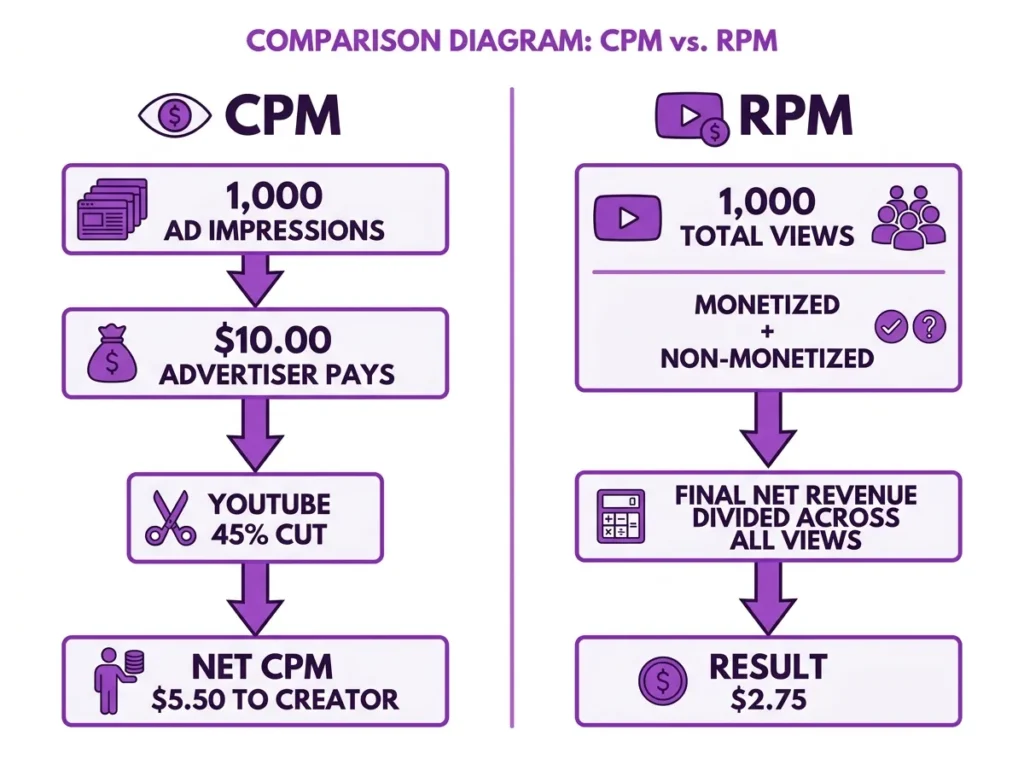
What advertisers pay per 1,000 ad impressions. YouTube takes a 45% cut, leaving you with a lower Net CPM per 1,000 monetized views.
RPM (Revenue Per Mille)
What you actually earn per 1,000 total views, regardless of whether an ad played. Because only a fraction of your views are monetized, your RPM is always lower than your CPM.
Shorts vs Long-Form
The revenue share is inverted for YouTube Shorts. Creators keep 45% of Shorts revenue (vs 55% for Long-Form), and Shorts CPMs are drastically lower (usually under $0.20).
Total Net Revenue
- -
Your true take-home pay after YouTube's cut.
Revenue Breakdown
Your True Metrics
Total Net Revenue divided by all views (x 1000).
Most YouTube creators plan their income around CPM, but CPM is not what lands in your bank account. This free calculator shows your actual net revenue after YouTube’s platform cut, factoring in your monetized playback rate, content format, YouTube Premium revenue, and fan funding.
CPM (Cost Per Mille) is what advertisers pay per 1,000 ad impressions. RPM (Revenue Per Mille) is what you actually earn per 1,000 total video views, after YouTube deducts 45% on Long-Form content or 55% on Shorts. Because only a fraction of your views trigger a monetized ad playback, your RPM will always be a smaller number than your CPM.
Why CPM and RPM Tell You Very Different Stories
The gap between CPM and RPM catches most creators off guard, and it goes deeper than just the platform’s revenue share.
Advertisers bid on ad slots. That winning price per 1,000 impressions is your Gross CPM. YouTube immediately keeps 45% of that for Long-Form videos and 55% for YouTube Shorts. What you receive is your Net CPM, applied only to your monetized playbacks, which are the views where an ad actually played and a viewer watched enough of it to count.
RPM then spreads your total net earnings across every single view, including the ones with no ad. A video with 500,000 views but only 225,000 monetized playbacks dilutes your per-view earnings significantly. This is why two channels with the same CPM can have wildly different RPMs depending on their audience behavior and niche.
If you already track revenue across other platforms, the Spotify Streams to Money Calculator shows how streaming platform cuts follow a similar pattern throughout the creator economy.
How YouTube Calculates the Revenue You Actually Take Home
The net revenue formula has four components: Gross CPM, monetized playback rate, YouTube’s revenue share, and any supplemental income from Premium subscribers or fan funding.
Long-Form Net Revenue Formula: Net Ad Revenue = (Total Views x Monetized Playback Rate) / 1,000 x (Gross CPM x 0.55)
Shorts Net Revenue Formula: Net Ad Revenue = (Total Views x Monetized Playback Rate) / 1,000 x (Gross CPM x 0.45)
YouTube Premium subscribers do not trigger standard auction-based ads. Instead, YouTube distributes a proportional share of its Premium subscription pool to creators based on watch time. This appears as a separate line in your revenue breakdown and typically adds 5-15% on top of your net ad revenue.
Fan Funding through Super Chats and Channel Memberships is subject to a 30% platform service fee before reaching your balance, so $100 in Super Chats yields $70.00, not $100.00.
When This Calculation Doesn’t Apply: If your channel has not yet qualified for the YouTube Partner Program (requiring 1,000 subscribers and 4,000 watch hours for Long-Form, or 1,000 subscribers and 10 million Shorts views), no ad revenue is being generated and these formulas will return $0.00 in real terms.
Once you have your net revenue figure, the Content Creator Home Studio Tax Write-Off Estimator helps you identify which deductions apply to your creator income.
YouTube Gross CPM Benchmarks by Content Niche (2026)
Advertiser demand varies sharply by niche. Finance and business content commands premium CPMs because viewers are high-intent buyers. Gaming and meme content attracts lower advertiser bids. Use this table before running your own numbers.
Standard YouTube Gross CPM and RPM Reference Values by Niche (2026)
| Content Niche | Gross CPM Range (USD) | Avg Monetized Playback Rate | Estimated RPM Range |
|---|---|---|---|
| Finance / Business | $12.00 – $30.00 | 40% – 55% | $3.50 – $9.00 |
| Tech / Education | $8.00 – $18.00 | 38% – 50% | $2.00 – $5.50 |
| Gaming / Meme | $2.00 – $6.00 | 30% – 45% | $0.50 – $1.80 |
| YouTube Shorts (All Niches) | $0.05 – $0.20 | 1% – 5% | $0.01 – $0.06 |
| General / Custom | $4.00 – $12.00 | 35% – 48% | $1.00 – $3.50 |
Industry benchmark ranges. CPM rates peak seasonally in Q4 and dip in Q1. Always cross-reference with your own YouTube Studio data.
Worked Example: A Finance Creator with 500,000 Long-Form Views
Meet Priya, a personal finance creator who posts Long-Form videos. Her latest video pulled 500,000 views. Here are her Studio numbers:
- Total Views: 500,000
- Gross CPM: $10.00
- Monetized Playback Rate: 45%
- YouTube Premium Revenue: 10%
- Fan Funding (Gross): $20.00
Step 1: Calculate Monetized Playbacks 500,000 x 0.45 = 225,000 monetized playbacks
Step 2: Gross Advertiser Revenue 225,000 / 1,000 x $10.00 = $2,250.00
Step 3: Deduct YouTube’s 45% Cut $2,250.00 x 0.45 = $1,012.50 (YouTube keeps this) Net Ad Revenue = $2,250.00 – $1,012.50 = $1,237.50
Step 4: Add YouTube Premium Revenue (10%) $1,237.50 x 0.10 = $123.75
Step 5: Add Fan Funding After 30% Fee $20.00 x 0.70 = $14.00
Total Net Revenue: $1,237.50 + $123.75 + $14.00 = $1,375.25
Effective Total RPM: $1,375.25 / (500,000 / 1,000) = $2.75
This matches exactly what the calculator outputs, confirming the formula is working correctly. Priya’s Playback-Based CPM (what she earns per 1,000 monetized playbacks) is $5.50, which is noticeably higher than her RPM because not all 500,000 views were monetized.
Mistakes That Seriously Skew Your YouTube Revenue Estimates
Budgeting with CPM instead of RPM is the most widespread error. If you project a monthly income based on your $10.00 CPM figure, you are overestimating your actual take-home by more than 70% before accounting for monetized playback rates.
Treating Shorts and Long-Form revenue as equal is a costly assumption. Shorts creators keep only 45% of ad revenue compared to 55% for Long-Form, and the CPMs on Shorts are a fraction of Long-Form rates. A Shorts video with 1 million views at a $0.15 CPM often generates under $5.00 in net revenue.
Adding Fan Funding at face value is another common trap. Many creators look at their Super Chat total and add it directly to their earnings projection. The 30% YouTube service fee is automatic and non-negotiable, so always apply the 0.70 multiplier before adding it to your income figure.
Not using the Reverse Calculate mode to audit Studio numbers is a missed opportunity. Your YouTube Studio dashboard shows your RPM, but running a reverse calculation here independently verifies whether that figure aligns with your inputs. Discrepancies can indicate traffic spikes from non-monetizable regions or a temporary demonetization flag.
According to YouTube’s official monetization policy documentation, revenue share percentages and YPP eligibility criteria are subject to change. Always verify your current terms inside YouTube Studio before building a financial model around these figures.
If you stream on other platforms, the Kick vs. Twitch Earnings Migration Calculator lets you compare platform revenue splits side by side, so you can see whether a platform switch affects your overall creator income.
How to Use the YouTube CPM vs RPM Calculator
The tool opens on Forecast Future Earnings mode by default. Switch to Reverse Calculate from Revenue using the tab at the top if you are working from real Studio data.
Forecast Future Earnings Mode:
- Select your video format using the toggle: Long-Form (55% Rev Share) or Shorts (45% Rev Share).
- Enter your Total Video Views in the views field.
- Open the Content Niche dropdown and select your category: Custom, Finance/Business, Tech/Education, or Gaming/Meme. This adjusts the default CPM benchmark.
- Enter your Gross CPM in USD. Use your Studio average or the niche benchmarks above.
- Set your Monetized Playbacks percentage. YouTube Studio shows this under your video analytics.
- Enter your Premium Revenue percentage if known, or leave at the default.
- Check Include Fan Funding (Super Chats/Members) if applicable and enter your gross fan funding amount before the fee. The tool deducts YouTube’s 30% automatically.
- Set your Base Pricing Currency and choose a Convert Revenue To currency to see your net earnings in another denomination.
- Press Calculate Metrics. Your Total Net Revenue, full Revenue Breakdown, and Effective Total RPM appear instantly below.
Reverse Calculate from Revenue Mode:
- Click the Reverse Calculate from Revenue tab at the top of the tool.
- Enter your Total Video Views, Actual Ad Revenue pulled directly from YouTube Studio, and your Estimated Monetized Playbacks count.
- Check Include Fan Funding if applicable and enter the gross amount.
- Press Calculate Metrics to back-calculate your true RPM and verify your effective metrics independently.
After calculating, use Copy URL to Share to save a shareable link with your inputs pre-filled, Print Report for a physical record, or Email Result to send the breakdown directly.
Accurate, Free, and Built for 2026 Creator Economics
This tool applies YouTube’s current 45%/55% revenue share model and accounts for YouTube Premium revenue distribution and the Fan Funding 30% service fee. It is completely free, requires no account or sign-up, and runs entirely in your browser. The Reverse Calculate mode is specifically designed for creators who want to audit or verify the numbers already showing in YouTube Studio, giving you an independent confirmation layer on top of your own channel analytics.
Frequently Asked Questions About YouTube CPM and RPM
Why is my RPM always lower than my CPM?
CPM is what advertisers pay per 1,000 ad impressions, while RPM is your net earnings spread across every 1,000 total views. Since only a portion of views trigger a monetized playback and YouTube takes a 45% cut, your RPM will always be a fraction of your CPM.
Does YouTube Shorts pay less per view than Long-Form content?
Yes, significantly less. Shorts creators keep only 45% of ad revenue compared to 55% for Long-Form, and advertiser CPMs for Shorts content typically range from $0.05 to $0.20 versus $4.00 to $30.00 for Long-Form. Both the lower revenue share and the lower CPMs compound the difference.
How does Fan Funding factor into my Effective Total RPM?
YouTube Studio bundles fan funding income into your overall channel RPM figure. This calculator adds it as a separate line item, automatically deducting YouTube’s 30% service fee on Super Chats and memberships, so your Effective Total RPM reflects your genuine take-home from all active revenue streams combined.
Ready to see your real numbers? Scroll back up, enter your views and CPM, and hit Calculate Metrics. It updates instantly.
Formula accuracy verified for standards.