
Content Repurposing: Time vs Profit Calculator
Calculate the exact ROI of turning 1 long-form video into multiple Shorts. Compare the profit and time-cost of editing them yourself, outsourcing to an editor, or using an AI clipper.
Repurposing Output & Revenue
Time & Production Costs
* Enter the minutes it takes YOU to edit, title, and upload 1 Short.
Financial Breakdown
* This is how much you effectively earn per hour of your time spent managing or editing this workflow.
Production & Targets
-- views per Short
Most creators guess at whether repurposing pays off. This YouTube Shorts monetization calculator gives you a real number your net cash profit and effective hourly rate based on your actual views, RPM, and production method.
A content repurposing ROI calculator measures the net profit from turning one long-form video into multiple YouTube Shorts. It factors in ad revenue, extra revenue per short, production costs, and your time investment to show whether repurposing is financially worth it.
How the YouTube Shorts Revenue Sharing Model Actually Works
YouTube Shorts earnings don’t follow the same model as traditional YouTube. Instead of paying creators directly per view, YouTube pools all ad revenue from ads shown between shorts in the Shorts feed. That pool is then split creators receive 45% of the revenue share, while youtube retains the remaining 55%.
Your cut of that shared pool is proportional to your public shorts views relative to total shorts views across all eligible creators. This revenue sharing model means your shorts RPM fluctuates based on the entire platform’s ad performance, not just your content niche. According to YouTube’s official Partner Program policy, creators must be in the YouTube Partner Program to access Shorts ad revenue sharing.
Because of this revenue split, calculating earnings from YouTube Shorts requires knowing your net RPM not your gross RPM. The Shorts net RPM already accounts for YouTube’s cut, making it the correct input for any accurate youtube shorts revenue calculator.
The Repurposing ROI Formula (And Where It Gets Complicated)
The core calculation behind this tool works in layered steps:
Gross Batch Revenue: (Number of Shorts) x (Average Views per Short) x (Shorts Net RPM / 1000) + (Extra Rev per Short x Number of Shorts)
Total Cash Cost depends on your production method:
- AI Tool: Software cost for the batch
- Outsourced Editor: Editor flat rate x number of shorts
- Self-Edited: $0 direct cost
Hidden Opportunity Cost: (Time to Edit/Review 1 Short in mins / 60) x Number of Shorts x Your Hourly Value
Net Cash Profit: Gross Revenue - Cash Cost
Effective Hourly Rate: Net Cash Profit / Total Time Investment (hrs)
Limitations to know: RPM figures are averages your actual shorts earnings will vary by content type, audience geography, and seasonal ad spend. The long-form traffic funnel estimate (click-through to long-form x long-form net RPM) is a projection, not a guarantee. If your hourly value input is $0, the opportunity cost section will show $0, which may understate the real time trade-off for full-time creators.
YouTube Shorts RPM Benchmarks by Niche (2026 Reference)
| Content Niche | Typical Shorts Net RPM (USD) | Notes |
|---|---|---|
| Finance / Business | $0.08 – $0.18 | Higher advertiser demand |
| Tech / Software | $0.06 – $0.14 | Strong US/UK audience premium |
| Lifestyle / Vlog | $0.03 – $0.08 | High volume, lower CPM |
| Gaming | $0.02 – $0.06 | Very high view counts, low RPM |
| Education / How-To | $0.05 – $0.12 | Consistent year-round ad spend |
| Fitness / Health | $0.04 – $0.10 | Seasonal spikes in Q1 |
| Entertainment / Comedy | $0.02 – $0.05 | Viral reach, minimal ad revenue per view |
These benchmarks reflect net RPM after the YouTube revenue sharing split. Use them as a starting reference, then adjust based on your actual YouTube Studio data.
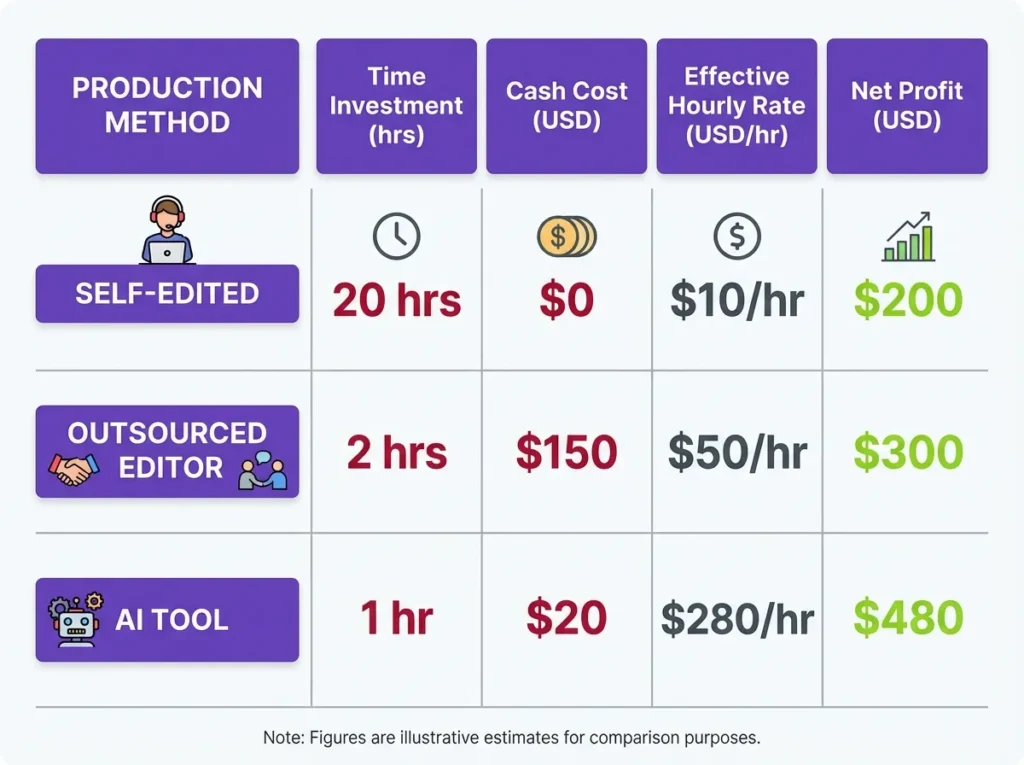
A Real Repurposing Scenario: From One Video to a Content Engine
Meet Tariq, a finance educator in Dubai who posts weekly long-form videos. He clips 20 shorts per video using an AI tool (OpusClip) at $10/batch. Each short averages 250,000 views. His Shorts net RPM is $0.05, and he earns $5 extra per short from affiliate links.
Step-by-step calculation:
- Gross ad revenue:
20 x 250,000 x (0.05 / 1000) = $250.00 - Extra revenue:
20 x $5 = $100.00 - Total gross:
$250 + $100 = $350.00 - Cash cost (AI tool):
-$10.00 - Opportunity cost: 10 mins review x 20 shorts = 3.3 hrs x $0 hourly value = $0
- Net Cash Profit: $340.00
- Effective Hourly Rate: $102.00/hr
Tariq’s content calendar now generates $340 per long-form video with just 3.3 hours of review time using repurposed content that required no additional shooting. That’s the compounding power of short-form video content strategy done right.
When Tariq switches to self-editing (30 mins/short at $1/hr hourly value), his time investment jumps to 10 hours, the hidden opportunity cost surfaces, and his effective hourly rate drops significantly even though the net cash profit stays similar. This tool makes that trade-off visible before he commits to a production method.
For creators working with a team, the Video Editor Revenue Share vs Flat Rate Calculator can help you decide whether paying your editor a flat rate or a revenue share deal is more profitable over time.
Common Mistakes That Distort Your Shorts Earnings Estimate
Using gross RPM instead of net RPM. The most frequent error. Your YouTube Studio shows a gross figure always subtract YouTube’s 55% cut before entering it here, or simply use the net figure from your Shorts analytics tab.
Ignoring the opportunity cost field. If you’re a full-time creator with a real hourly value, leaving this at $0 will make self-editing appear far more profitable than it is. Set your hourly value honestly what you could earn doing something else in that same hour.
Setting extra revenue per short to $0 by default. Many creators use shorts to promote: affiliate products, digital downloads, or Patreon memberships. Even $1–$3 per short compounds heavily across a batch of 20 shorts. Don’t leave this blank.
Over-estimating click-through to long-form. Shorts creators often assume high CTR from the “Created From” link on Shorts to their long-form video. Real-world data shows 1-3% is a reasonable estimate for most channels. Inflating this number makes the long-form traffic funnel revenue projection unreliable.
If you also monetize live streams alongside your Shorts strategy, the YouTube Super Chat & Apple Cut Calculator shows exactly how much you keep after platform fees.
How to Use This Calculator (Step-by-Step)
The tool has two panels: Repurposing Output & Revenue on the left, and Time & Production Costs on the right.
Left panel fill in:
- Number of Shorts Created (per Long Video): Enter how many clips you produce from one long-form video (e.g., 10 or 20).
- Average Expected Views (per Short): Your realistic per-short view estimate based on past performance.
- Shorts Net RPM: Your net RPM in USD after YouTube’s revenue split (find this in YouTube Studio).
- Extra Rev (per Short): Any affiliate, sponsorship, or product revenue tied to each short.
- Include Long-Form Traffic Funnel: Check this box to add revenue from Shorts viewers clicking through to your long-form video. Two sub-fields appear Click-Through to LF (%) and Long-Form Net RPM.
Right panel select your production method:
- AI Tool (e.g., OpusClip, Munch): Enter the software cost for this batch and your review time per short.
- Self-Edited (My Time): Enter minutes to edit one short and your hourly value.
- Outsourced (Editor): Enter the editor’s flat rate per short and your time to manage/review each one.
Currency settings: Select your base currency and a second currency to convert net profit. The tool supports 20+ currencies including PKR, INR, AED, and TWD.
Hit Calculate Repurposing ROI. The results panel shows your Total Cash Profit, Financial Breakdown (gross revenue, cash cost, opportunity cost, effective hourly rate), Production Targets (total views, time investment), Cash Break-Even Target in views per short, and your converted net profit.
Free, Accurate, and Built for Real Creator Math
This youtube shorts revenue calculator uses the actual YouTube Partner Program revenue sharing model not simplified estimates. The formula accounts for all three production methods, opportunity cost, multi-currency conversion, and the optional long-form traffic funnel. There are no paywalls, no sign-ups, and no ads distorting your results.
All currency exchange rates are sourced from live market data to keep your converted figures reliable. Whether you’re a solo short-form video creator or managing a content production pipeline, the numbers you get here reflect real creator economics.
FAQs About YouTube Shorts Earnings & Repurposing ROI
What is a good Shorts net RPM to enter in this calculator?
For most niches, a Shorts net RPM between $0.03 and $0.10 USD is realistic in 2026. Finance and tech content typically sits at the higher end. Use your actual YouTube Studio Shorts analytics for the most accurate result average benchmarks can misrepresent your specific audience geography and content type.
Does this calculator work if I don’t monetize with ads?
Yes. If your youtube shorts earnings come entirely from affiliate links or sponsorships, set your Shorts Net RPM to $0.00 and enter your sponsorship or affiliate value in the “Extra Rev per Short” field. The tool will calculate your net profit based on that revenue stream alone.
How is the Cash Break-Even Target calculated?
The cash break-even target tells you the minimum views per short needed to cover your cash costs (software or editor fees). It does not factor in opportunity cost it’s purely the view threshold at which your ad revenue generated equals your out-of-pocket spend. A result of 0 means your extra revenue per short already covers all costs before any ad revenue.
Can I use this for content repurposing across platforms other than YouTube Shorts?
The RPM and revenue sharing model inputs are calibrated for YouTube Shorts specifically. For Instagram Reels or TikTok, ad revenue models differ significantly. You can still use the tool by entering a custom net RPM that reflects your platform’s payout, though the accuracy will depend on how reliable your off-platform RPM estimate is.