
Faceless YouTube ROI Forecaster
Forecast costs, compounding revenue, and exact break-even points for your YouTube Automation channel.
1st Month Net Profit
12-Month Profit Projection
Running a faceless YouTube channel with AI tools means every cost and every view can be modeled before you post a single video. This forecaster turns your real production numbers into a 12-month profit projection, break-even point, and year-one ROI so you build with data, not guesswork.
A faceless YouTube ROI forecaster calculates your channel’s expected net profit by comparing production costs (editing, voiceover, scripts) against ad revenue based on your RPM and views factoring in month-over-month compounding view growth over a full year.
Why Most Faceless AI Channels Fail Without a Financial Blueprint
Most creators launching a faceless YouTube channel with AI underestimate one thing: the gap between their first upload and their break-even point. Production costs stack up fast editing software, AI voiceover tools like ElevenLabs, stock footage subscriptions, and thumbnail design in Canva all hit your margin before your first monetization dollar arrives.
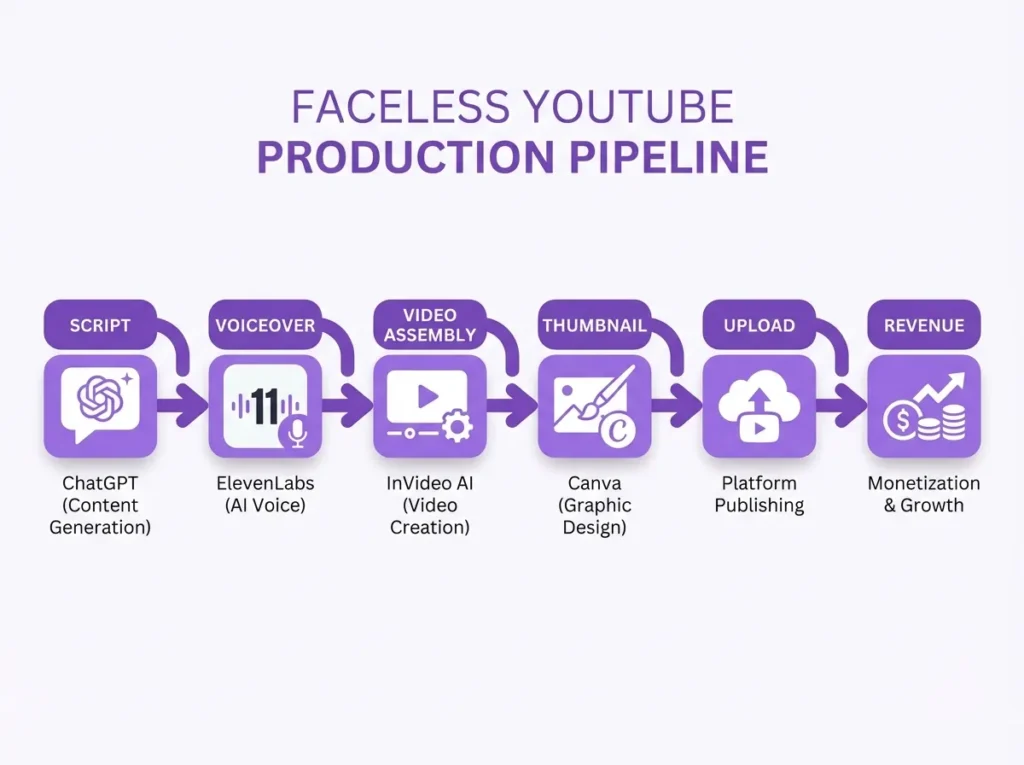
Without modeling your workflow upfront, you’re spending blind. This tool gives you a complete blueprint: input your real costs and expected views, and it shows you exactly when revenue covers costs and what your ROI looks like at 12 months. If you’re also tracking your startup-style overhead, the Startup Burn Rate Calculator pairs directly with this tool.
The ROI Math Behind Faceless YouTube Channel with AI – Formulas & Limits
The core calculations follow this logic:
Monthly Revenue: Views per Video x Videos per Month x (Net RPM / 1000)
Net Monthly Profit: Monthly Revenue – (Cost per Video x Videos per Month) – Fixed Monthly Costs
Break-Even Point (views per video): Total Monthly Cost / (Net RPM / 1000) / Videos per Month
Compounding Revenue (Month N): Views Month 1 x (1 + MoM Growth Rate)^(N-1)
Year 1 ROI: (Total Year Profit / Total Year Cost) x 100
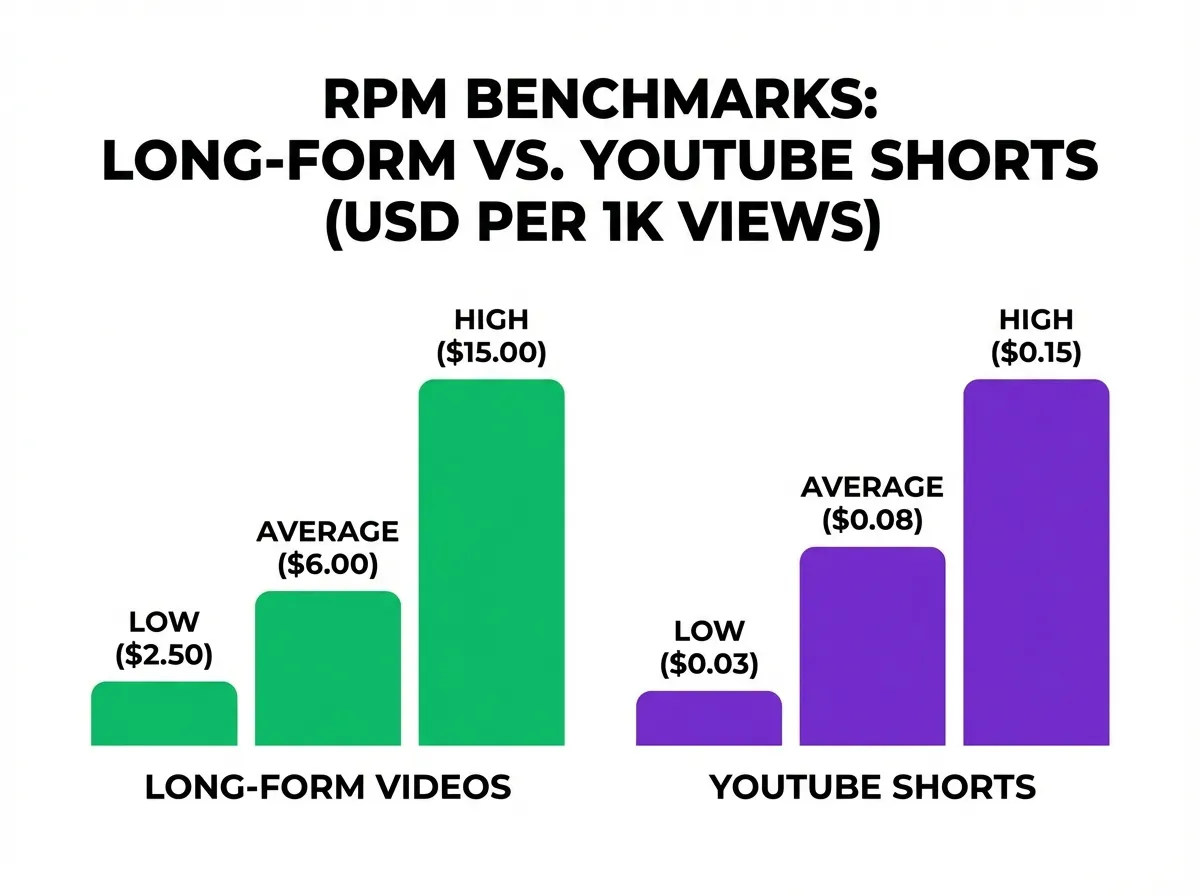
The tool handles both Long-Form Content and YouTube Shorts separately, since RPM benchmarks differ significantly between formats. Long-form videos 8+ minutes qualify for mid-roll ads, which can push effective RPM higher the tool flags this with an inline note.
Limitations to know:
- RPM fluctuates by niche, season, and audience geography. The tool uses your input as a fixed benchmark, not a dynamic variable.
- View growth compounding assumes consistent upload cadence. Any publishing gap resets real-world momentum.
- Ad revenue is the only revenue stream modeled. Affiliate marketing and sponsorships are not included in this calculation.
- YouTube’s monetization threshold (1,000 subscribers + 4,000 watch hours, or 10M Shorts views) must be reached before any ad revenue is earned the tool does not gate results behind this milestone, so factor your ramp-up period manually.
A Real Channel Scenario: Long-Form AI Content, 20 Videos/Month
Meet Dani. She runs a faceless educational content channel using InVideo AI for video assembly and ElevenLabs for AI voiceover. Here’s her setup:
- Cost per video: $20 (editing + script via ChatGPT)
- Fixed monthly costs: $100 (subscriptions)
- Videos per month: 20
- Average video length: 10 minutes
- Expected views per video (Month 1): 200,000
- MoM view growth rate: 1%
- Expected Net RPM: $3.00
Step-by-step:
Monthly Revenue = 200,000 x 20 x (3 / 1000) = $12,000
Total Monthly Cost = (20 x 20) + 100 = $500
Month 1 Net Profit = $12,000 – $500 = $11,500
Break-Even Point = 500 / (3 / 1000) / 20 = 8,334 views/video
Year 1 Profit (with 1% MoM compounding) = $146,190
Year 1 ROI = 2,436.5%
This matches the output shown in the calculator’s Long-Form tab. Dani’s channel covers production costs at just 8,334 views per video well below her projected 200,000 meaning she’s profitable from month one. High-retention content in a strong RPM niche is what makes that math work.
Mistakes That Kill Faceless YouTube Channel Revenue (and How to Fix Them)
Even a well-executed faceless channel can bleed money if these are ignored:
1. Misjudging your real Net RPM. Creators often plug in gross RPM from YouTube Analytics instead of net RPM (after YouTube’s 45% cut). Always use your actual net RPM figure from your revenue dashboard. A common benchmark for English-language educational content sits between $2–$6 net RPM, but finance and tech niches can reach $8–$15.
2. Ignoring video length for monetization. YouTube requires videos to be 8+ minutes to qualify for mid-roll ads. If your average video length is under 8 minutes, your effective RPM will be lower. The Long-Form tab in this tool includes an inline note flagging this threshold.
3. Treating Shorts and Long-Form as the same. YouTube Shorts RPM is dramatically lower often $0.03–$0.07 per 1,000 views because Shorts run a separate ad revenue pool. The tool’s Shorts tab uses a separate input layout to reflect this difference. Use the Break-Even Point Calculator to cross-check how many Shorts views you’d need to cover a comparable production cost.
4. Skipping the subscriber growth model. High content volume without audience retention strategy burns budget without building a durable content library. Your subscriber count affects algorithm distribution, which feeds back into view consistency. Tools like Midjourney for thumbnails and a tight script format each episode improve click-through and watch time simultaneously.
Faceless YouTube Channel Benchmarks: RPM, Costs & ROI by Niche
Use this table as a starting reference when filling in your forecaster inputs. These figures reflect real-world ranges observed across established faceless AI channels your actual numbers will vary by audience geography, content strategy, and upload consistency.
| Niche | Typical Net RPM (USD) | Avg. Cost/Video (AI Pipeline) | Break-Even Views/Video | Realistic Month 1 Views | Est. Year 1 ROI Range |
|---|---|---|---|---|---|
| Finance & Investing | $6.00 – $14.00 | $15 – $40 | 1,500 – 4,500 | 5,000 – 50,000 | 300% – 2,000%+ |
| Software & SaaS Reviews | $5.00 – $12.00 | $10 – $30 | 1,200 – 4,000 | 3,000 – 30,000 | 250% – 1,800% |
| Educational / Explainer | $2.50 – $6.00 | $10 – $25 | 2,500 – 7,000 | 10,000 – 200,000 | 200% – 2,400% |
| AI & Tech News | $3.00 – $7.00 | $8 – $20 | 1,800 – 5,000 | 8,000 – 100,000 | 180% – 1,500% |
| Health & Wellness | $3.00 – $6.50 | $10 – $25 | 2,200 – 6,000 | 5,000 – 60,000 | 150% – 1,200% |
| True Crime / Mystery | $1.80 – $4.00 | $15 – $35 | 5,000 – 14,000 | 20,000 – 300,000 | 100% – 900% |
| Motivation & Self-Help | $1.50 – $3.50 | $8 – $20 | 3,500 – 10,000 | 15,000 – 250,000 | 80% – 800% |
| YouTube Shorts (All Niches) | $0.03 – $0.08 | $2 – $8 | 150,000 – 500,000 | 50,000 – 5,000,000 | Varies widely |
AI Tool Cost Benchmarks (Monthly Subscriptions):
| Tool | Function | Approx. Monthly Cost |
|---|---|---|
| InVideo AI | Video assembly & AI voiceover | $25 – $60 |
| ElevenLabs | Dedicated AI voiceover tool | $5 – $99 |
| ChatGPT Plus | Script writing & ideation | $20 |
| Midjourney | Thumbnail & visual generation | $10 – $60 |
| Canva Pro | Thumbnail design | $15 |
| Stock Footage (generic) | B-roll library access | $15 – $50 |
| Lean AI Pipeline Total | ~$75 – $150/month | |
| Full AI Pipeline Total | ~$150 – $300/month |
How to use this table: Find your niche row and plug the RPM midpoint into the forecaster as your Expected Net RPM. Use the Break-Even Views column to sanity-check whether your Month 1 view estimate is realistic before committing to a production workflow budget.
How to Use the Faceless YouTube ROI Forecaster
The tool has two tabs at the top: Long-Form Content and YouTube Shorts. Select the format that matches your channel.
Long-Form Content tab fields to fill:
- Cost per video (Edit, Voice, Script): Enter your per-video production cost in USD (e.g., $20 covers a ChatGPT script + AI voiceover tool + light editing).
- Fixed Monthly Costs (Subscriptions): Add recurring software costs InVideo AI, ElevenLabs, Canva Pro, stock footage subscriptions (e.g., $100/month).
- Videos published per month: Your planned upload cadence (e.g., 20).
- Average Video Length (minutes): Enter the average runtime. The tool notes that 8+ minutes unlocks mid-roll ad eligibility.
- Expected views per video (Month 1): Your realistic Month 1 view estimate per video.
- MoM View Growth Rate (Compounding): Monthly percentage growth in views (e.g., 1% = steady organic growth). Set to 0 for flat projection.
- Expected Net RPM (per 1k views): Your net RPM in USD. Use your YouTube Analytics figure or a realistic benchmark for your niche.
- Convert Output To: Select your local currency from the dropdown (supports USD, AED, JPY, INR, GBP, EUR, and 15+ others) to see Year 1 profit in your home currency.
Hit Calculate ROI Forecast. The results panel shows:
- 1st Month Net Profit (large display figure)
- Break-Even Point (views/video needed to cover costs)
- Total Monthly Cost
- Expected Year 1 Profit (with compounding growth)
- Year 1 ROI %
- Year 1 Profit in Target Currency (with live exchange rate shown)
- 12-Month Profit Projection bar chart
The YouTube Shorts tab uses a simplified layout no video length field since Shorts RPM operates on a separate revenue pool with different benchmarks.
Use Reload Calculator to reset, Print to save a PDF copy, or Share to send your scenario to a collaborator.
Free, Formula-Accurate, and Built for Real YouTube Creators
This tool is 100% free with no login required. The compounding revenue formula mirrors how YouTube channels actually scale not a flat linear projection. RPM inputs accept any value, so it works for every niche from educational content to finance to AI-generated content channels. Currency conversion uses live exchange rates displayed inline with each result so you always know the exact rate applied. The two-tab structure (Long-Form vs Shorts) reflects the real structural difference in how YouTube monetizes each format. No data is stored or shared.
FAQs About the Faceless YouTube ROI Forecaster
What is a good Net RPM benchmark for a faceless AI channel?
Net RPM for English-language faceless AI channels typically ranges from $1.50 to $5.00 depending on niche. Finance, software, and business content tends to earn $4–$12 net RPM, while entertainment and general AI content usually falls between $1–$3.
Does this calculator include YouTube Shorts revenue?
Yes. Switch to the YouTube Shorts tab for a layout optimized for Shorts it removes the video length field and uses RPM benchmarks appropriate for the Shorts ad revenue pool, which pays significantly less per 1,000 views than long-form content.
Why is my break-even point higher than expected?
Your break-even point rises when either your per-video cost is high, your RPM is low, or your video output per month is low. The three levers that lower your break-even are: reducing production costs (using more AI-assisted tools), improving RPM through niche selection, and increasing content volume to spread fixed costs across more videos.
Can this tool forecast passive income from sources other than ads?
No. This forecaster models ad revenue only. To factor in affiliate marketing, sponsorships, or digital product sales, you’d add those projections manually to the Year 1 output figure.
Formula accuracy verified for standards.