
Most newsletter creators price their paid tier, count their subscribers, and multiply. Then Substack takes 10%. Then Stripe takes 2.9% plus $0.30 per transaction. Then churn quietly erodes the number you were proud of. This calculator shows you what you actually keep.
Enter your free list size, your conversion rate, your pricing, and your platform. Get your true net MRR, your blended subscriber Lifetime Value, and a full 12-month growth projection in seconds.
Why Your Newsletter Revenue Looks Different in Your Bank Account
Every newsletter creator hits the same wall. The math on paper looks promising. A free list of 5,000 subscribers with a 2% free-to-paid conversion rate at $5/month feels like $500 MRR. But that number has not touched platform fees, Stripe processing costs, or subscriber churn yet.
Net MRR is what lands in your account after every fee is subtracted. For Substack creators specifically, that means a 10% platform cut on top of Stripe’s mandatory 2.9% plus $0.30 per transaction. On a $5/month subscription, your total effective fee can reach 17% or higher depending on your monthly vs annual subscriber mix.
This tool accounts for all of it, including sponsorship revenue from ad CPM if you run a sponsored newsletter alongside your paid tier. You can also check similar revenue math for other creator platforms using our Skool Community Break-Even & Profit Calculator.
The Revenue Formula Behind the Forecaster
The calculator runs two parallel models depending on which tab you select.
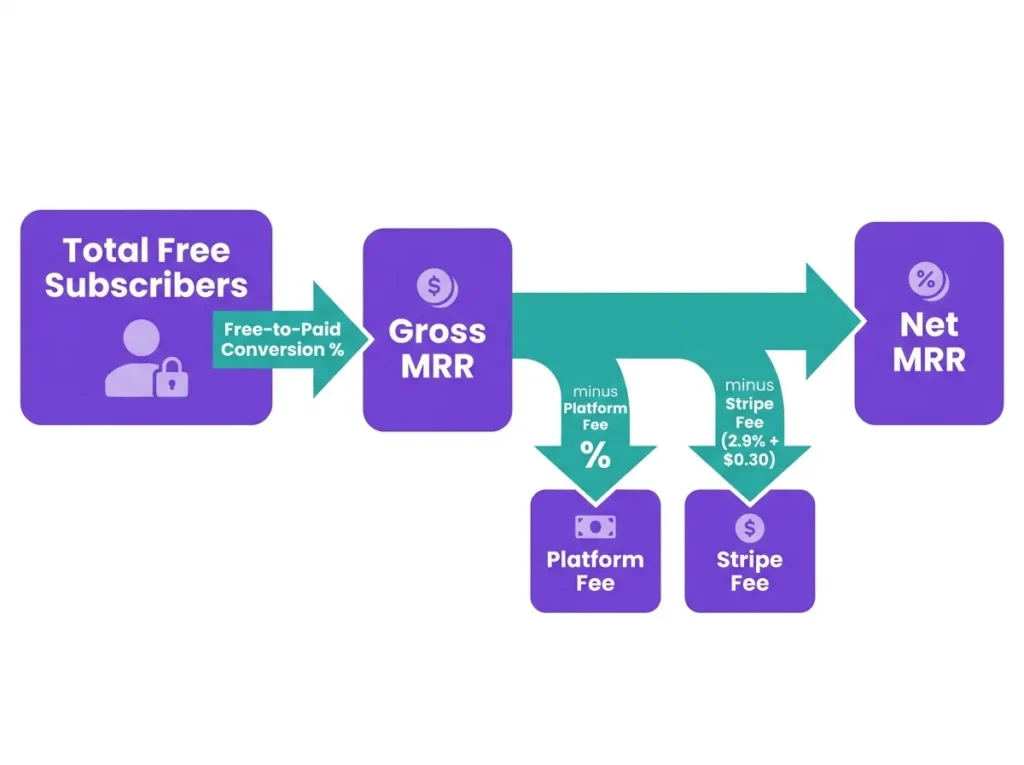
Current List Snapshot computes your MRR from your existing free list right now:
Paid Subscribers = Free Subscribers x (Free-to-Paid Rate / 100)
Gross MRR = (Monthly Subs x Monthly Price) + (Annual Subs x Annual Price / 12)
Net MRR = Gross MRR - Platform Fee - Stripe Fees
Where Stripe Fees are calculated per transaction as: (Subscription Amount x 2.9%) + $0.30
12-Month Growth Forecast compounds your free subscriber list monthly using your MoM Growth Rate, adds new paid conversions each month, and subtracts monthly and annual churn to project where your MRR lands at the end of Year 1.
Blended LTV is calculated as:
Blended LTV = Weighted Average Monthly Revenue per Subscriber / Blended Monthly Churn Rate
According to Stripe’s official documentation, the 2.9% plus $0.30 per transaction fee applies to all standard card payments and cannot be waived regardless of platform.
When This Calculation Doesn’t Apply: If your newsletter operates on a community membership model with one-time fees, cohort launches, or manual invoicing outside of Stripe’s recurring billing, the MRR and LTV projections here will not reflect your actual revenue pattern.
Newsletter Platform Fee Reference: What Each Platform Actually Costs
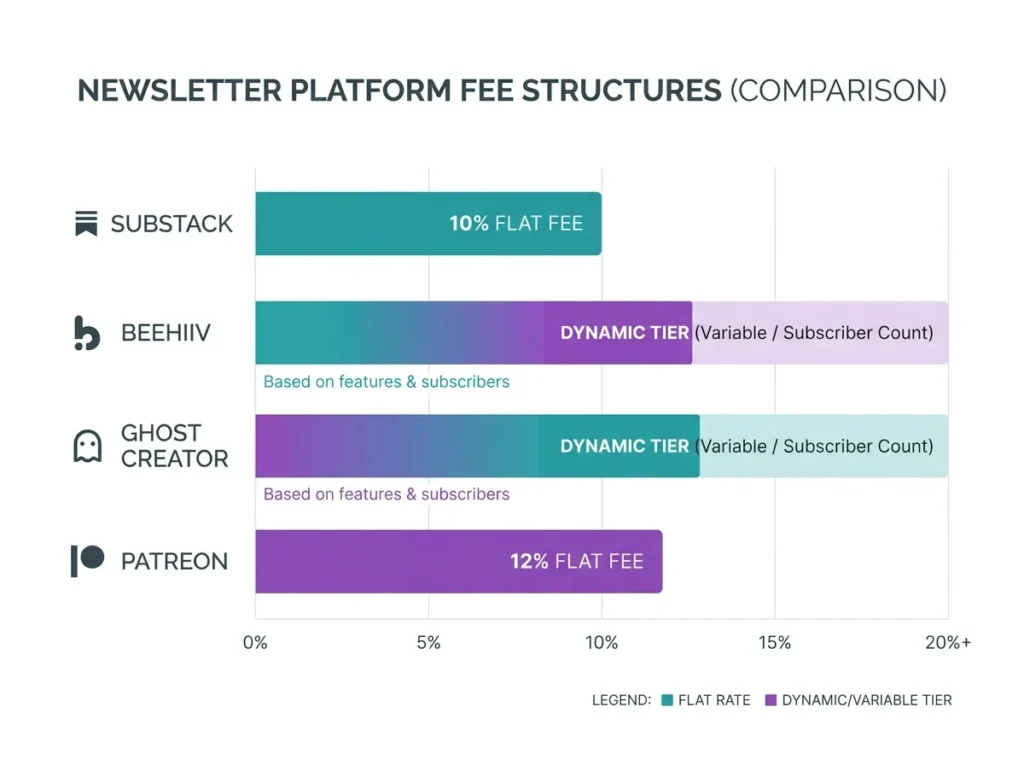
Standard Newsletter Platform Fee Structures (2026)
| Platform | Platform Fee | Stripe Fee | Notes |
|---|---|---|---|
| Substack | 10% of revenue | 2.9% + $0.30 / transaction | No monthly fixed cost |
| Beehiiv | Dynamic tier (0% on Scale+) | 2.9% + $0.30 / transaction | Monthly subscription required |
| Ghost Creator | Dynamic tier (0% on Creator+) | 2.9% + $0.30 / transaction | Self-hosted option available |
| Patreon | ~12% of revenue | 2.9% + $0.30 / transaction | Varies by membership tier |
| Custom | User-defined % | 2.9% + $0.30 / transaction | For independent setups |
At a $5/month price point, Substack’s total effective fee typically lands between 16% and 18% depending on your monthly vs annual subscriber ratio. Beehiiv and Ghost reduce platform cuts to 0% on paid plans, but you absorb a fixed monthly platform cost instead. Use the “Custom Fees” option in the calculator to model any independent setup.
Scenario: A Creator with 5,000 Free Subscribers on Substack
Meet Priya. She runs a weekly finance newsletter on Substack with 5,000 free subscribers. Her free-to-paid conversion rate sits at 2%, and she charges $5/month or $50/year. About 30% of her paid subscribers choose the annual plan. Her monthly subscriber churn is 5% and annual churn is 20%.
Here is what the calculator produces:
- Total Paid Subscribers: 100
- Monthly Subs: 70 | Annual Subs: 30
- Gross MRR: $475.00
- Platform Cut (10%): -$47.50
- Stripe Fees: -$35.53
- Net MRR: $391.98
- Blended LTV: $121.64 per subscriber
- Total Effective Fee: 17.5%
The Conversion Optimization Scenario shown in the results panel is worth paying close attention to. If Priya improves her welcome sequence and lifts her free-to-paid rate by just 0.5%, her Net MRR jumps to $489.97. That is $97.99 more per month without adding a single new subscriber to her free list.
If you run video content alongside your newsletter, the YouTube Copyright Claim Revenue Loss Estimator helps you quantify how demonetization affects your total creator income.
The Metrics That Most Newsletter Creators Get Wrong
Free-to-paid conversion rate benchmarks vary widely. Most newsletter operators default to 2% as their assumed rate. In reality, conversion rates on Substack range from below 1% for broad general interest newsletters to above 5% for highly niche, high-trust audiences. Plugging in an optimistic 5% without evidence will inflate your forecast significantly.
Churn destroys compounding growth faster than most creators expect. A 5% monthly churn rate means you lose roughly half your paid subscriber base every 14 months, assuming no new conversions. The 12-month forecast tab in this tool shows this erosion compounding in real time, which is why the projected Month 12 MRR often surprises creators on their first run.
Annual plan mix changes your Stripe fee math. Because Stripe charges $0.30 per transaction, a $50 annual charge costs roughly $1.775 in fixed fees versus 12 separate $0.30 charges ($3.60) on a monthly plan. A higher annual plan ratio lowers your effective Stripe fee percentage, improving net revenue.
For creators also selling through a link-in-bio stack, the Link in Bio Revenue Calculator pairs well with this tool to model your full creator revenue picture across platforms.
How to Use the Substack Revenue Calculator
The tool has two tabs at the top: Current List Snapshot and 12-Month Growth Forecast. Here is how to use each one.
Current List Snapshot tab:
- Enter your Total Free Subscribers in the Audience and Conversion Funnel panel on the left.
- Set your Free-to-Paid %, Monthly Churn %, and Annual Churn % in the three fields below it.
- Optionally enter Newsletters per Month and Average Ad CPM if you run sponsorships.
- On the right panel, enter your Monthly Tier Price and Annual Tier Price in USD.
- Set the % of Paid Subs on Annual Plan.
- Select your Publishing Platform from the dropdown. The calculator auto-fills the platform fee. Options include Substack (10%), Beehiiv, Ghost Creator, Patreon (~12%), and Custom.
- Choose your Base Pricing Currency and the currency you want to Convert Net Revenue To if you need a local currency output.
- Click Forecast Revenue to generate your results.
12-Month Growth Forecast tab:
Follow the same steps above, but also enter New Free Subs (Month 1) and your MoM Growth Rate %. The calculator will compound your free subscriber base monthly and project your paid subscriber count and Net MRR through Month 12.
Results display your Current Net MRR or Projected Month 12 Net MRR, a full Audience Snapshot, a Financial Breakdown (Gross MRR, Platform Cut, Stripe Fees, Total Effective Fee %), your Blended LTV, and a Conversion Optimization Scenario showing the revenue impact of a 0.5% conversion rate improvement.
Use the Print or Share buttons to export your forecast for a pitch deck, investor summary, or personal planning document.
Why This Calculator Gives You Numbers You Can Actually Use
This tool uses Stripe’s live standard processing rate (2.9% plus $0.30 per transaction) baked directly into every calculation. Platform fees are sourced from each platform’s current published pricing and auto-populated when you select from the dropdown, so you never have to guess at the math.
The currency conversion feature supports 20+ global currencies, making this tool practical for newsletter creators outside the US market as well. All calculations run locally in your browser. No data is stored or transmitted.
The 12-month compounding model uses the same core logic that SaaS companies use to project annual recurring revenue, applied specifically to the newsletter subscription context where free list growth, churn, and conversion interact in real time.
FAQs About the Newsletter MRR Calculator
Does this calculator work for Beehiiv and Ghost, not just Substack?
Yes. The Publishing Platform dropdown includes Beehiiv (Dynamic Tier, 0% fee on qualifying plans), Ghost Creator (Dynamic Tier, 0% fee on qualifying plans), Patreon (~12% fee), and a Custom option where you enter any platform percentage and fixed monthly cost manually. Each selection auto-populates the Platform % Fee and Fixed Monthly Cost fields.
What is Blended LTV and how is it calculated?
Blended Lifetime Value is the average total revenue one paid subscriber generates before they cancel. The calculator weights your monthly and annual subscriber mix, computes a weighted average monthly revenue per subscriber, and divides it by your blended monthly churn rate. A higher annual plan ratio and lower churn both push LTV up significantly.
Why does my Net MRR look much lower than my Gross MRR?
On Substack at a $5/month price point, platform fees (10%) and Stripe fees (2.9% plus $0.30 per transaction) together consume roughly 17% to 18% of every dollar collected. On smaller subscription prices, the fixed $0.30 Stripe charge per transaction has a disproportionately large impact. This is why the Total Effective Fee % shown in your results often surprises first-time users.
Can I use this for a newsletter with both paid tiers and sponsorships?
Yes. The Sponsorships and Ads section in the Audience and Conversion Funnel panel accepts your number of newsletters per month and your average ad CPM. The calculator adds this sponsorship revenue into your gross revenue before applying fees, giving you a blended total MRR that reflects both your subscription income and your ad revenue.
Ready to see your real numbers? Scroll back up, enter your list size and pricing, and click Forecast Revenue — your net MRR and 12-month projection update instantly.
Formula accuracy verified for standards.