
AI Video API Cost Estimator
Estimate the total API cost to generate AI videos. Calculate the chained costs of LLMs (scripting), TTS/SFX (audio), Video Generation models (visuals), and Post-Processing.
Project Scope & LLM Scripting
Audio & Voiceover Generation
* Auto-calculated as Output Tokens × 4.
Visual Generation (Images & Video)
Post-Processing & Infra
Developers automating video pipelines must pay cloud fees for heavy MP4s. (Est. ~$0.02 per video min).
Total Project API Cost
- -
Cost Per Video: --
API Pipeline Breakdown
Selected Models
Building AI videos with chained APIs is powerful, but the costs across GPT-4o, ElevenLabs, Runway, and post-processing tools add up fast. This free estimator gives you a complete, line-by-line cost breakdown before you commit a single dollar to production.
Plug in your video count, pick your LLM, TTS provider, video generation model, and post-processing tools. The calculator chains all four pipeline stages and outputs your total project cost, cost per video, and a budget optimization scenario showing you the cheapest viable alternative stack.
Why AI Video API Costs Are Harder to Predict Than You Think
Most developers and content teams estimate AI video costs by looking at individual API pricing pages in isolation. That approach misses the compounding effect of a chained pipeline.
A 60-second AI video does not just cost the video generation fee. It also costs LLM tokens for scripting, TTS characters for voiceover, image generation credits for storyboard frames, lip-sync API minutes, AI upscaling fees per frame, and cloud storage for the output file. When you’re producing 10, 50, or 100 videos at scale, those secondary costs routinely dwarf the video generation cost itself.
This is exactly the gap this tool closes. Instead of a rough back-of-napkin estimate, you get a real chained API cost projection. If you need to compare creator monetization options alongside your production budget, the Substack Newsletter Revenue Calculator is a useful companion for forecasting net returns.
How the AI Video Production Pipeline Cost Formula Works
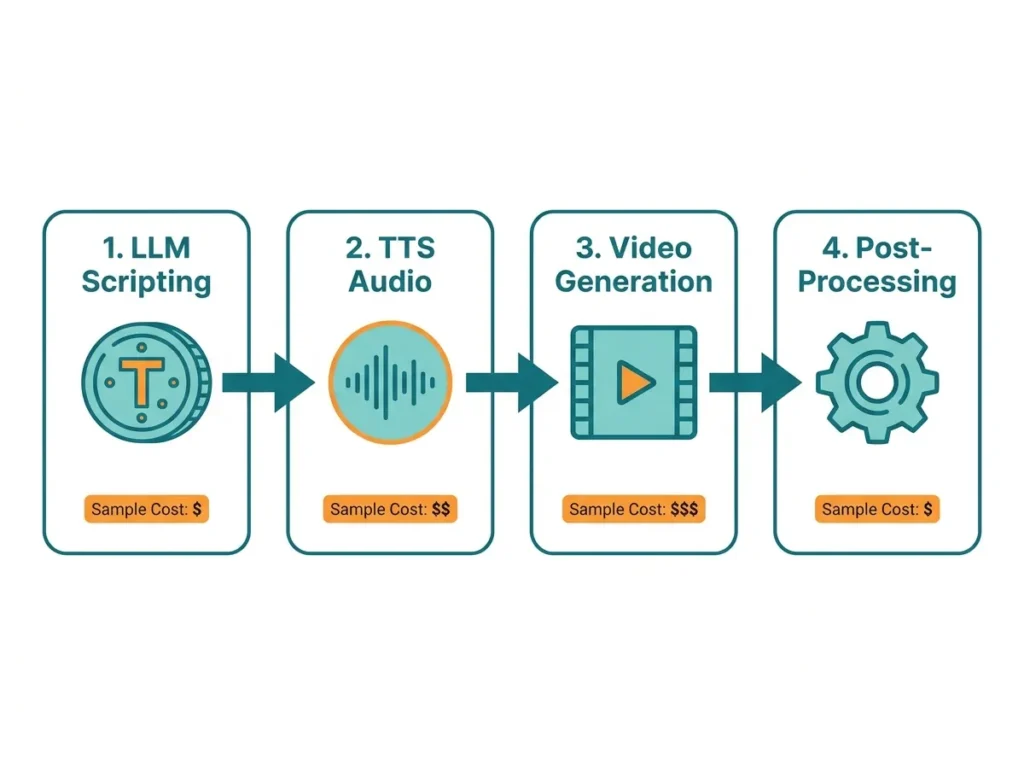
The total project cost is the sum of five sequential pipeline stages:
Total Cost = LLM Cost + Image Generation Cost + Video Generation Cost + Audio Cost + Post-Processing Cost
Each stage breaks down as:
- LLM Cost:
(Input Tokens x Input Rate) + (Output Tokens x Output Rate)x Videos - Image Cost:
Images Per Video x Cost Per Imagex Videos - Video Cost:
Video Length (secs) x Cost Per Second x Reroll Tax Multiplierx Videos - Audio Cost:
TTS Characters x Cost Per 1k Chars+Music Tracks x Cost Per Track x Video Length - Post-Processing Cost:
Lip-Sync (mins) x Rate+Upscaling (frames) x Rate+Storage/Bandwidth
The Reroll Tax is a critical variable most estimators ignore. AI video models fail or produce unusable outputs at a measurable rate. If your model fails 3 times per accepted output, your real video generation cost is 4x the base rate. This tool factors that in automatically.
When This Calculation Doesn’t Apply: If you are using flat-rate GUI subscriptions (like Midjourney Pro or Runway Unlimited at $30-$76/month), per-second and per-image API rates do not apply. The tool flags this scenario with a “GUI Subscription Reality Check” alert when your estimated API cost exceeds the subscription threshold.
AI Video API Model Pricing Reference (2026)
AI Video Pipeline API Rate Comparison by Stage
| Pipeline Stage | Provider / Model | Approx. Rate |
|---|---|---|
| LLM Scripting | GPT-4o | $5 in / $15 out per 1M tokens |
| LLM Scripting | Claude 3.5 Sonnet | $3 in / $15 out per 1M tokens |
| LLM Scripting | Gemini 1.5 Pro | $1.25 in / $5 out per 1M tokens |
| LLM Scripting | GPT-4o-mini | $0.15 in / $0.60 out per 1M tokens |
| TTS / Voiceover | ElevenLabs | $0.18 per 1k chars |
| TTS / Voiceover | OpenAI TTS-1-HD | $0.03 per 1k chars |
| TTS / Voiceover | Google Cloud Neural2 | $0.016 per 1k chars |
| Base Image | Midjourney API | ~$0.05 per image |
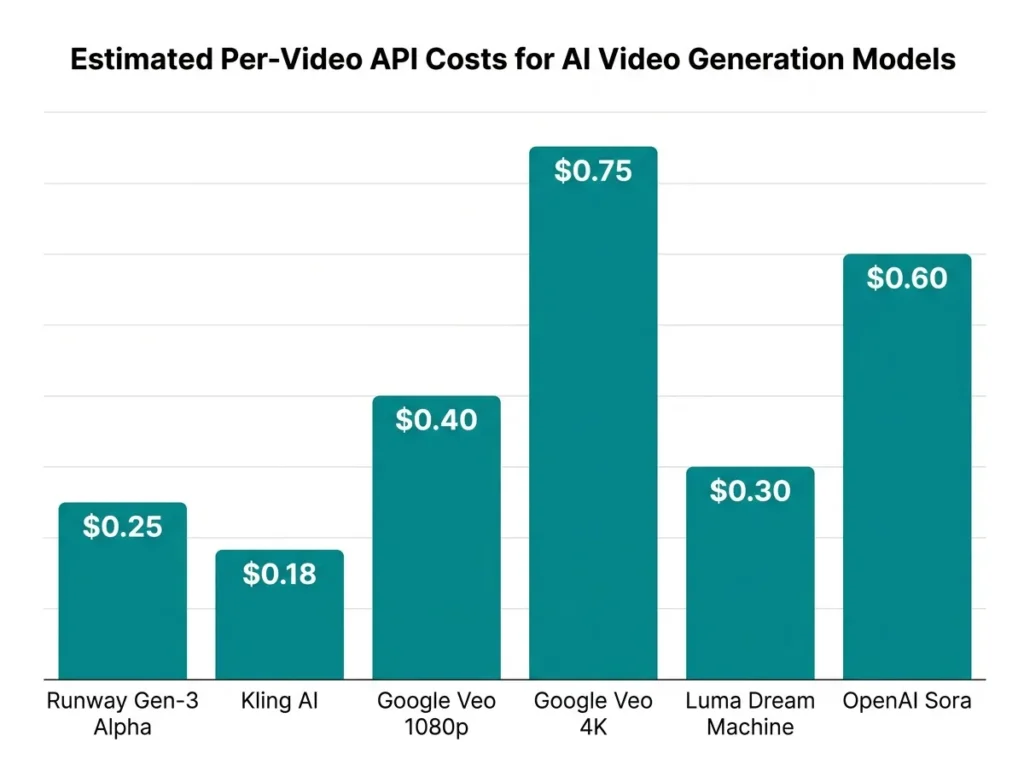
| Video Generation | Runway Gen-3 Alpha | ~$0.28 per sec |
| Video Generation | Kling AI | ~$0.15 per sec |
| Video Generation | Google Veo (1080p) | ~$0.25 per sec |
| Video Generation | Google Veo (4K) | ~$0.50 per sec |
| Video Generation | Luma Dream Machine | ~$0.32 per sec |
| Video Generation | OpenAI Sora | ~$0.50 per sec (est.) |
| Lip-Syncing | SyncLabs | ~$1.00 per min |
| Lip-Syncing | HeyGen | ~$3.00 per min |
| AI Upscaling | Magnific | ~$0.10 per frame |
| AI Upscaling | Topaz Cloud | ~$0.05 per sec |
| Storage/Bandwidth | AWS/GCP | ~$0.02 per video min |
Real Pipeline Cost Walkthrough: 10-Video YouTube Shorts Batch
A digital marketing agency wants to produce 10 x 60-second AI videos using a mid-tier stack.
Their chosen pipeline:
- LLM: GPT-4o (5,000 input tokens, 1,000 output tokens per video)
- Base Images: Midjourney at 15 images per video
- Video: Runway Gen-3 Alpha at 60 secs, reroll tax = 3 attempts
- TTS: ElevenLabs at 4,000 characters per video
- Lip-Sync: SyncLabs
- Upscaling: Magnific
- Storage: AWS/GCP included
Calculation per video:
- LLM: (5,000 x $0.000005) + (1,000 x $0.000015) = $0.025 + $0.015 = $0.04
- Images: 15 x $0.05 = $0.75 (wait, tool shows $22.50 total / 10 = $2.25 per video)
- Video: 60 secs x $0.28 x 3 rerolls = $50.40 per video
- Audio: (4,000 / 1,000) x $0.18 = $0.72 per video
- Post-Processing: SyncLabs + Magnific + Storage = $145.04 per video
Total per video: ~$198.43 Total for 10 videos: ~$1,984.26
The tool’s Budget Optimization Scenario then shows: switching to GPT-4o-mini + Google Neural2 + Kling AI drops the total to $1,743.31, saving $240.95 on the same batch.
For agencies also pricing out creator partnerships alongside production costs, the UGC Brand Deal Pricing Calculator helps align production budgets with deal rates.
The Costs That Kill AI Video Budgets (And How to Avoid Them)
Post-processing is the silent budget killer. Most first-time AI video producers focus entirely on video generation model rates. In the example above, post-processing and infra costs ($1,450.16) outweigh the video generation cost ($504.00) by nearly 3x.
Three specific mistakes drive this:
1. Ignoring the Reroll Tax. Runway Gen-3 Alpha, Sora, and Luma all produce failed or misaligned outputs regularly. A reroll rate of 3 means you are paying for 4 attempts per accepted video. Budget for it from day one.
2. Using HeyGen for Lip-Sync at Scale. At $3.00/min vs SyncLabs at $1.00/min, HeyGen costs 3x more for identical output quality on long-form videos. Reserve HeyGen for avatar-based content where it has a real quality advantage.
3. Skipping the GUI Subscription Check. If your API cost estimate for a project exceeds $30-$76, a flat Midjourney Pro or Runway Unlimited subscription may be cheaper for that batch. This tool’s built-in reality check flags exactly when you hit that threshold.
Brands building multi-video packages can also use the Brand Sponsorship Package Builder to build deliverable pricing on top of their production cost baseline.
How to Use the AI Video API Cost Estimator
The tool has two modes at the top: Full AI Pipeline (Script + Audio + Visuals) and Script & Audio Only (Stock Visuals). Select the mode that matches your production setup.
Step 1 – Project Scope & LLM Scripting (top-left panel): Enter your total video count in the “Total Videos to Generate” field. Select your LLM model from the dropdown (GPT-4o, Claude 3.5 Sonnet, Gemini 1.5 Pro, or GPT-4o-mini). Enter your Input Tokens (context) and Output Tokens (script) per video. The TTS character count auto-fills as Output Tokens x 4.
Step 2 – Visual Generation (top-right panel): Select your Base Image API (Midjourney at ~$0.05/img) and enter how many images per video. Then choose your Video Generation Model from the dropdown, which includes Runway Gen-3 Alpha, Kling AI, Google Veo (1080p and 4K), Luma Dream Machine, and OpenAI Sora. Set your Video Length in seconds and your Reroll Tax (expected failed attempts per accepted output).
Step 3 – Audio & Voiceover Generation (bottom-left panel): Choose your TTS Provider (ElevenLabs, OpenAI TTS-1-HD, or Google Cloud Neural2). The character count auto-fills, but you can override it. For Music & SFX, select Suno AI, Udio AI, ElevenLabs SFX, or None/Stock, then enter tracks per second.
Step 4 – Post-Processing & Infra (bottom-right panel): Choose a Lip-Syncing API (None, SyncLabs, or HeyGen) and an AI Upscaling API (None, Magnific, or Topaz Cloud). Check the AWS/GCP Storage & Bandwidth box if your pipeline outputs heavy MP4 files to cloud storage.
Step 5 – Currency & Output: Set your Base Pricing Currency (USD is the API standard) and select a local conversion currency from the dropdown (20+ currencies supported including PKR, INR, EUR, GBP, AED, and more). Hit Calculate API Costs.
The results panel shows your Total Project API Cost, Cost Per Video, a full API Pipeline Breakdown by stage, and your Selected Models summary. Below that, the Budget Optimization Scenario shows the cheapest alternative stack, and the GUI Subscription Reality Check flags whether a flat subscription would be more cost-effective for your project volume.
Why This Estimator Gives You Numbers You Can Actually Trust
All API rates in this tool are sourced directly from official provider pricing pages, including OpenAI’s API pricing documentation, and are reviewed regularly to reflect current market rates.
The tool is completely free, requires no account or login, and runs entirely in your browser. The chained cost formula accounts for compounding rates across all four pipeline stages, not just the headline video generation fee. The budget optimization output uses the same formula applied to the most cost-effective model substitutions available in 2026.
FAQs About AI Video API Cost Estimation
What is the reroll tax and why does it matter so much?
The reroll tax is the number of additional generation attempts your pipeline needs for every one accepted output. A rate of 3 means 4 total generations per video. On Runway Gen-3 Alpha at $0.28/sec for a 60-second clip, each attempt costs $16.80 so a reroll tax of 3 pushes your real video cost to $67.20 before any other pipeline stage.
Is it always cheaper to use APIs than a GUI subscription for AI video production?
Not always. For low-volume projects (1-5 videos), per-second and per-image API rates are usually more economical. But for higher volumes, flat subscriptions like Midjourney Pro (~$30/month for unlimited) or Runway Unlimited (~$76/month) can cost significantly less than equivalent API calls. The tool’s GUI Subscription Reality Check calculates this threshold automatically based on your inputs.
Why does the TTS character count auto-fill?
The tool estimates TTS characters as Output Tokens x 4, because one LLM output token averages approximately four characters of readable text. This gives a reliable voiceover character estimate directly from your scripting parameters without requiring a separate manual input.
Can I use this tool for the Script & Audio Only pipeline if I plan to use stock footage?
Yes. Select the “Script & Audio Only (Stock Visuals)” tab at the top of the tool. This mode removes the Visual Generation and Video Generation sections entirely and calculates only your LLM scripting and TTS audio costs, which is the accurate scope for stock-footage-based AI video workflows.
Ready to see the real numbers? Scroll back up, pick your models, and hit Calculate the full pipeline breakdown updates instantly.
Formula accuracy verified for standards.